

AWSLambda · 16 min read
Lambda Web Functions: What Changes When Waiting Stops Costing CPU

On this page
Back in June I wrote about AWS Lambda MicroVMs [17], the Lambda form factor that gives every agent its own isolated computer. On 12 October 2026 Lambda got another form factor. There are now three shapes of Lambda, all on the same Firecracker isolation [1], and the new one runs a web server, the most common thing anyone puts behind an HTTPS URL.
You can deploy the Express app you already have. That part is pleasant, but the part I keep coming back to is the bill.
Three Lambdas now
The launch post lays out the family [1]:
- Event Functions are what we used to call Lambda functions. Only the name changed. AWS calls it “a naming change only that requires no code changes or redeployments” [2]. One request per execution environment, billed for wall-clock duration.
- Web Functions run an HTTP server that listens on a port. One environment handles up to 128 concurrent requests [1], and you’re billed for the CPU your code uses.
- MicroVMs are isolated, stateful sandboxes with a lifecycle you control, built for running untrusted or user-generated code [1].
In the launch post’s example account, Event Functions handle the asynchronous backend processing and Web Functions serve the user-facing API and the server-side rendering, with MicroVMs for interactive code execution [1].
Deploying the app you already have
Here is the complete example from the launch post [1]:
import express from 'express';

const app = express();
const [host, port] = process.env.AWS_LAMBDA_HTTP_ENDPOINT.split(':');

app.get('/', (req, res) => {
  res.json({ message: 'Hello from Lambda Web Functions!' });
});

app.listen(port, host, () => {
  console.log(`Server running on port ${port}`);
});
There’s one Lambda-aware line in there. It reads AWS_LAMBDA_HTTP_ENDPOINT, a host:port string that Lambda sets and that your server has to listen on [5]. The samples in the developer guide add a fallback (|| 'localhost:3000') so the same file runs on your laptop [5]. TLS ends at the endpoint, and Lambda forwards plain HTTP to your process, so you don’t have certificates in your code [5].
Deployment is one CLI command:
aws lambda-web deploy --name my-web-app --code ./my-app
The first run creates (or reuses) a versioned S3 bucket and an execution role, creates the Web Function with its first revision, attaches an endpoint named dev, and waits for it to become active [15]. A revision is an immutable snapshot of code and configuration, and an endpoint is the HTTPS URL that routes to one revision or splits traffic between two [4]. Running the same command again after a code change moves the endpoint to the new revision. If you want a canary, you set revision weights on the endpoint, 90/10 for example [1].
Add --regions us-east-1,eu-west-1,ap-northeast-1 and Lambda replicates the code to those Regions and routes each request to the lowest-latency one, on a best-effort basis, behind a single global URL [1].
How a request is billed
An Event Function bills you for the time from when your code starts to when it returns, times the memory you configured [8]. So if a request spends 2.8 of its 3 seconds waiting on a model to stream tokens, you pay for 3 seconds.
Web Functions split that into separate meters [8]:
- $0.30 per million requests.
- $0.0000276944 per vCPU-second of active CPU, which means the CPU time your application and the runtime actively consume.
- $0.0000036667 per GB-second of memory, for as long as each execution environment exists.
- Standard data transfer rates.
Those are the rates the pricing page uses in its worked examples, for US East (N. Virginia) on Arm [8]. Compute is billed at 1 ms granularity. And since one environment serves many requests at the same time, that environment’s CPU and memory are shared across all of them [8].
If you build AI endpoints, read the pricing page’s fourth example. A service streams tokens from a large language model. It gets 5 million requests a month, each connection stays open for 3,000 ms, and 200 ms of that is active CPU, in an environment using about 512 MB [8]:
- Active vCPU: 5,000,000 × 0.2 s = 1,000,000 vCPU-seconds → $27.69
- Memory: 0.5 GB × 2,592,000 s (one environment all month) → $4.75
- Requests: $1.50
- Total: $33.94 a month [8]
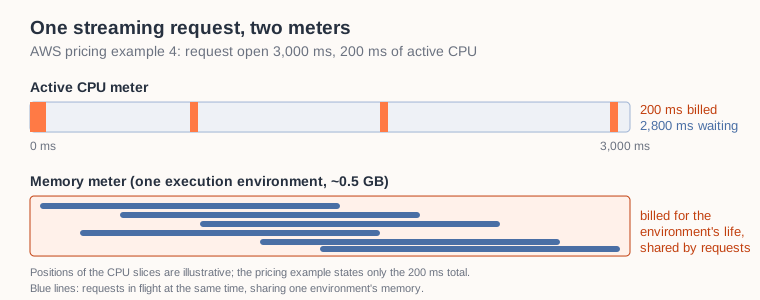
The pricing page’s LLM streaming example: a request is open for 3,000 ms, the CPU meter runs for 200 ms of it, and one environment’s memory is shared by the requests in flight.
As the pricing page puts it, “Each request stays open for 3 seconds, but you pay for only the 200 ms of active CPU” [8]. The pricing page points out a second saving too. With about six requests in flight at any moment, they share one environment’s memory, so you pay for one environment instead of six [8].
For comparison, the same workload on Event Functions at 512 MB would, by my own rough math, bill the full 3 seconds per request: 5,000,000 × 3 s × 0.5 GB = 7.5 million GB-seconds. At the $0.0000166667 per GB-second rate the pricing page uses in its x86 Event Function examples [8], that comes to about $125 of compute, or about $126 with the $0.20-per-million request fee, roughly 3.7 times the $33.94 Web Function total. The figure ignores the Event Function free tier, the architectures differ and so does the memory sizing, so treat it as an illustrative calculation for a route that mostly waits, not a like-for-like migration result. When a request mostly waits, the wall-clock meter charges for the waiting and the CPU meter mostly does not.
Where active-CPU billing helps less
Active-CPU billing rewards waiting: the vCPU meter stops while a request waits, though memory keeps accruing. It does much less for work that keeps the CPU busy, and there are three places where the numbers turn.
CPU-bound routes are the obvious case. The vCPU meter is the expensive one, and a route that does heavy rendering or parses large JSON keeps that meter running for most of the request. In the pricing page’s server-side rendering example, 40 ms of a 150 ms request is CPU, and the vCPU charge is the largest line of that bill [8].
Very short, high-volume requests pay more in request fees. Web Functions charge $0.30 per million requests [8], Event Functions $0.20 per million [8]. The pricing page’s authorizer example has 100 million requests of 50 ms each, and the request charge alone is $30 of a $64.56 total [8].
And then there’s quiet traffic. Memory accrues for as long as an execution environment exists, idle time between requests included [3]. Lambda removes idle environments and scales to zero when there’s no traffic [7], but by that logic a steady trickle of requests keeps an environment alive, and then its memory keeps being metered.
Here’s a small Express app with one route that waits and one that keeps the CPU busy. /wait awaits a timer and stands in for any downstream call. /cpu spins synchronously:
app.get('/wait', async (req, res) => {
  const ms = clamp(req.query.ms ?? 500, 10000);
  await sleep(ms);                     // the event loop is free here
  res.json({ route: 'wait', requestedMs: ms });
});

app.get('/cpu', (req, res) => {
  const ms = clamp(req.query.ms ?? 50, 2000);
  const end = Date.now() + ms;
  while (Date.now() < end) {}          // blocks this process's event loop
  res.json({ route: 'cpu', busyMs: ms });
});
What the CPU meter saw in a test run
For this post the sample above was deployed as a Web Function in Europe (Ireland) with aws lambda-web deploy, capped at two execution environments, and called from a development machine over the internet. The deploy took 13 seconds, including the wait for the endpoint to become active.
Lambda publishes Web Function metrics to CloudWatch at no charge [19]. One of them, EnvironmentCPUTime, reports the vCPU time the execution environments consumed [19], and that is the quantity the pricing page calls active CPU [8]. It’s a proxy for the bill, not the invoice. Two windows of steady traffic, about a minute each, each run once:
/wait?ms=500from 16 parallel clients: 1,584 requests and roughly 13 minutes of combined request time. The environments recorded 0.27 seconds of CPU time./cpu?ms=50from 4 parallel clients: 2,000 requests. The environments recorded 103 seconds of CPU time, close to the 100 seconds the route spends spinning.
Both windows ran on the same two environments. Every request returned HTTP 200, and each CPU figure is the EnvironmentCPUTime Sum (namespace AWS/Lambda/Web) for the 2-minute datapoint that contains the window, so it slightly overstates the window. Memory use per window wasn’t measured, so the memory charge isn’t compared here. At the US East vCPU rate quoted on the pricing page [8], the first window’s CPU comes to less than a thousandth of a cent, the second to about 0.3 cents (Ireland’s rates can differ slightly). Treat these numbers as one unrepeated observation, not a benchmark: each window ran once, so there is no variance figure. The sample server and the load driver are in [20].
Concurrency inside one environment
With Event Functions, one environment handles one request at a time, so a global variable is never shared by two requests in flight, though it does persist across requests on a reused environment. Web Functions put up to 128 requests in one Node.js process with one event loop [4]. The default ceiling is 64, set per revision with maxConcurrencyPerEnvironment, and below that Lambda adjusts the real limit dynamically, based on how much of its resources your function is using [7].
On the test function, 50 concurrent /wait requests finished in about 0.8 seconds as seen from the client, barely longer than a single one, while twenty concurrent /cpu?ms=50 requests took about 0.6 seconds across the two environments, because each spin blocks its environment’s event loop until it’s done.
Throttling showed up in the very first burst, too. Right after the deploy, 50 simultaneous requests came back as 4 successes and 46 HTTP 429 responses. When no environment has room, Lambda throttles the request without queueing it [7]. The endpoint was capped at two environments, but the test didn’t isolate whether that cap, environments that were still starting, or the dynamic concurrency limit caused the 429s. After about ten seconds of steady traffic the same burst of 50 succeeded in full. So if you expect a spike at launch, test burst behavior, retry on 429, and don’t set maxEnvironments lower than you need. A warm-up run doesn’t last, because Lambda scales idle environments down to zero [7].
The runtime documentation spells out the consequences [5] [6]:
- Keep per-request data in request scope. A read-modify-write on shared state that spans an
awaitcan interleave with another request. - A synchronous CPU-heavy operation blocks every request in that environment. Move it to
worker_threadsor lowermaxConcurrencyPerEnvironment. - Each environment has 2 GB of memory and 2 Arm64 vCPUs [5] [16]. The default V8 heap is 1,024 MB, and heap, buffers, native modules and every in-flight request have to fit in the 2 GB [5].
- Caches and connection pools persist across requests, which is useful, but an environment can be removed at any time [6].
Most well-behaved Express or Hono apps follow these rules already, because that’s how a normal Node.js server works anyway. Code written for the one-request-per-environment model (a module-level variable holding the current user, say) needs a second look.
Endpoint access and CloudFront
The best-practices page opens with this sentence: “Every endpoint is reachable from the internet, whatever its authentication type” [9]. Each endpoint has one of two authentication types. ApplicationManaged forwards every request to your app, and your app then owns authentication. IamAuth requires callers to sign requests with SigV4 (SigV4a for multi-Region endpoints) [10].
For a public website or API, the documented pattern is CloudFront in front of an IamAuth endpoint, with origin access control (OAC) [10] [11]. CloudFront signs each origin request, and a resource-based policy on the Web Function lets only your distribution invoke the endpoint [10]. You get edge TLS, caching, custom domains and AWS WAF with it, and the origin integration itself has no additional fee beyond normal CloudFront and AWS WAF charges [12]. And if you want to stop teams from creating open endpoints in the first place, there are IAM condition keys on the endpoint’s authentication type, so you can allow or deny ApplicationManaged in policies [10].

The documented private-origin pattern: CloudFront in front of an IamAuth endpoint, with OAC signing every origin request.
Three details from the documentation are easy to miss:
- An
ApplicationManagedendpoint stays publicly reachable at its own domain even when CloudFront sits in front of it [10]. OAC only works withIamAuth. - The CloudFront origin request policy must not forward the viewer’s
Hostheader, because the endpoint expects its own domain name there [11]. - OAC doesn’t work for a multi-Region endpoint that includes an opt-in Region. All Regions behind the global endpoint have to be enabled by default [11].
Things to check before you move a route
The launch scope is specific, so check it against your app first:
- The only runtime is Node.js 24 (
nodejs24.x) [1] [5]. Python, Java and .NET workloads stay on Event Functions or MicroVMs for now [3]. - Web Functions run on Arm64 (Graviton) only [16]. Pure JavaScript runs unchanged, but any native dependency needs a Linux arm64 build [16].
- At launch the service runs in US East (N. Virginia), US East (Ohio), US West (Oregon), Asia Pacific (Tokyo) and Europe (Ireland) [2]. For European workloads that means Ireland.
- Endpoints speak HTTP/1.1 over HTTPS [18]. WebSocket upgrades aren’t supported. Server-sent events and response streaming are [13] [3].
- Endpoints always scale from zero. There’s no minimum or reserved-environment setting. Lambda keeps some headroom by scaling ahead of demand, but the first request after a quiet period waits for an environment to start [7].
- Your server has to start listening within 10 seconds [5]. An
Activerevision and endpoint don’t prove that your server starts, so send a test request after every deploy [4]. - Each request is bounded by the revision’s timeout, 3 to 900 seconds with a default of 30 [14]. A long model stream needs a higher value.
- Per Region, the account quotas at launch are 10,000 requests per second per endpoint, 100,000 across the account, and 2,000 vCPUs, which at 2 vCPUs per environment means at most 1,000 environments [7]. When an endpoint can’t scale further and every environment is full, Lambda returns HTTP 429 immediately and doesn’t queue the request; requests only wait while a new environment is still starting [7].
- With a multi-Region endpoint the serving Region can change between requests, so keep sessions out of the execution environment [13].
- The quotas your account actually has can be lower than the documented ones.
aws lambda-web get-web-account-settingsshows them. For the account used for this post it reported 200 Arm vCPUs and a 10,000 requests-per-second total. - You need an AWS CLI v2 release that includes the
aws lambda-webcommands [15]. Older v2 releases reject the command group. - If you pass your own bucket with
--bucket-name, it needs a bucket policy that lets the Lambda service principal read the object and its versions. Without it, the deploy stops with a validation error that says so. aws lambda-web delete-web-functionremoves endpoints and revisions, but leaves the execution role, the code packages in S3 and the log groups [15]. In the test there were two log groups to remove, the function’s own group and a.localcopy, which the monitoring guide describes [19].
Which Lambda for which job
| Event Functions | Web Functions | MicroVMs | |
|---|---|---|---|
| Programming model | Handler receives an event | Server listens on a port | Your app in a stateful sandbox |
| Requests per environment | One at a time | Up to 128 at once | Per-session environment |
| Billing | Requests + wall-clock duration × configured memory | Requests + active CPU + memory over environment life | Baseline memory and vCPU per second while running, plus active use above the baseline |
| Typical fit | Queues, file uploads and other AWS-service triggers | APIs, SSR, webhooks, streaming endpoints | Untrusted or AI-generated code, interactive sessions |
| Runtimes at launch | Node.js, Python, Java, .NET and more | Node.js 24 | Other languages, such as Python, Java and .NET |
Sources for the table: programming model, requests per environment and fit [1]; billing [8]. The runtime row for Event Functions and MicroVMs is from the developer guide’s note on other languages [3].
Reading the pricing model left me with a rule of thumb. If a route spends most of its time waiting on something else, it’s a good Web Function candidate. Things AWS services trigger (queues, uploads) still belong on Event Functions. For untrusted or user-generated code that needs an isolated, stateful sandbox, use a MicroVM.
Try it on one route
The cheapest experiment is a single route that mostly waits, the one that calls your model, say, or a slow downstream API. Deploy it with aws lambda-web deploy in a supported Region behind CloudFront with OAC, then compare its bill with the Event Function it replaces. For CPU-heavy routes, measure before you move them; the pricing model alone doesn’t say which way they land.
Which of your routes spends most of its life waiting?
Sources
- [1] Announcing AWS Lambda Web Functions, AWS News Blog, 12 Oct 2026
- [2] AWS Lambda announces Lambda Web Functions, AWS What’s New, 12 Oct 2026
- [3] AWS Lambda Web Functions, AWS Lambda Developer Guide
- [4] Core concepts, AWS Lambda Developer Guide
- [5] Lambda Web Function runtimes, AWS Lambda Developer Guide
- [6] Execution environment lifecycle, AWS Lambda Developer Guide
- [7] Scaling behavior for Lambda Web Functions, AWS Lambda Developer Guide
- [8] AWS Lambda pricing, AWS
- [9] Best practices for Lambda Web Functions, AWS Lambda Developer Guide
- [10] Lambda Web Function endpoint access control, AWS Lambda Developer Guide
- [11] Restrict access to an AWS Lambda Web Function origin, Amazon CloudFront Developer Guide
- [12] Amazon CloudFront now supports AWS Lambda Web Functions as an origin, AWS What’s New, 12 Oct 2026
- [13] Web Function sample applications, AWS Lambda Developer Guide
- [14] Request timeout, AWS Lambda Developer Guide
- [15] Creating a Lambda Web Function, AWS Lambda Developer Guide
- [16] Instruction set architecture, AWS Lambda Developer Guide
- [17] Give Every Agent Its Own Computer: AWS Lambda MicroVMs, schristoph.online, 24 Jun 2026
- [18] HTTP requests and responses, AWS Lambda Developer Guide
- [19] Monitoring Lambda Web Functions and Using CloudWatch metrics with Lambda Web Functions, AWS Lambda Developer Guide
- [20] lambda-web-functions, schristoph-blog-samples on GitHub: the server, the load driver and a README with the CloudWatch query
🎬 Also available as a blog walkthrough video on YouTube
❤️ Created with the support of AI (Kiro)