

AWS · 13 min read
What Should We Fix First? The Well-Architected Review Becomes an Agent

On this page
In 2021 Tufan Özduman and I wrote an article about the benefits of architecture reviews and how to run them [16]. Five years later, my view of where reviews get hard is simple. Asking the questions is the easy part. The hard part comes after the workshop, when the team holds a long list of risks and has to decide which few it will actually work on next sprint, and which it will consciously leave alone.
That is the part AWS now wants an agent to help with. AWS Well-Architected Agent went into public preview on October 1, 2026, and AWS describes it as the next evolution of Trusted Advisor and the Well-Architected Tool [1]. I read the launch post, the What’s New entry and the agent chapters of the user guide in full. This post is based on those public pages. I have not run the agent against an account myself yet, so everything below is what the documentation says it does, plus my view on what that means for the people who run reviews today.
What the agent does
You start by creating an agent profile. The profile names the AWS accounts and Regions to scan (up to 100 accounts), the optimization pillars to analyze, and your business goals [5] [8]. You then add application context: an overview, the accounts, Regions and tags that belong to an application, its industry, its type and its criticality (test and development, non-critical, business-critical or mission-critical) [5]. This is not optional. Without at least one application context the profile is flagged as invalid and the scheduled scan does not run [12].
From there the agent scans and produces recommendations at three levels [3] [5]:
- Resource recommendations target one resource, such as an EC2 instance, a Lambda function or an RDS database.
- Application recommendations span several related resources and consider how they interact. The user guide calls these “a new recommendation format currently in beta” [3].
- Architecture recommendations come from an on-demand review of an infrastructure-as-code project, before anything is deployed.
Resource and application recommendations refresh on a weekly cadence and cannot be triggered on demand [11] [7]. A single generation run produces at most 30 recommendations [8]. For a large estate that cap is a reason to scope profiles and application contexts tightly: 30 well-ranked items for one application are more useful than 30 items spread over a hundred accounts. The agent does not start from nothing. It ingests findings from Trusted Advisor and Security Hub CSPM, rightsizing signals from Compute Optimizer, resilience assessments from Resilience Hub, and cost signals from Cost Optimization Hub, and adds goal-based ranking, cross-pillar analysis and remediation on top [10]. The launch post says it analyzes against Well-Architected best practices across more than 65 AWS services [2].
Every recommendation then carries two things a classic findings list does not. It shows the positive impact on the other pillars, and it describes the trade-offs of acting on it, “including pillar, risk level, and mitigation strategy” [3]. The What’s New post gives the shape of it: a team that prioritizes reliability gets a recommendation to add Multi-AZ failover to a critical database, an SSM runbook that makes the change, and an analysis of what the change does to cost and performance “before you commit” [1].
For remediation you pick the route. The launch post lists console walk-throughs, updated IaC for architecture-level findings and AWS CLI commands [2]. The release notes add AI-generated SSM runbooks [4].
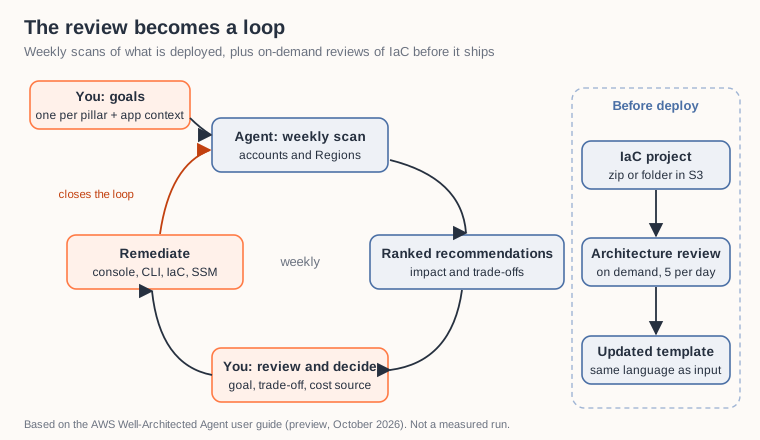
The review as a loop: goals in, weekly scan, ranked recommendations, your decision, remediation. IaC reviews run on demand before deploy.
The ranking is only as good as your goals
The agent ranks recommendations “against the business goals you define” [3]. A goal is a plain-text statement tied to one pillar, and a profile can hold up to ten of them [5] [8]. The user guide has a short section on writing goals, and it is the most useful page in the chapter [6]. Its advice: be specific, include a metric, set a timeframe, name the pillar explicitly, and do not write overlapping goals for the same pillar because they “dilute prioritization”. Its own contrast is “improve security” versus “eliminate all public Amazon S3 buckets”. The first, it says, produces broadly ranked recommendations. The second produces focused ones.
That changes what a review owner does before the first scan. Think about the same workload under two goal sets:
- A team with “Reduce EC2 spend by 20% by Q4 through rightsizing and Reserved Instance coverage” (the example goal from the API quickstart [14]) would, I expect, see rightsizing and other cost recommendations near the top, because the agent ranks cost recommendations against stated goals [10].
- A team with “Eliminate all public S3 buckets this quarter” next to a resilience goal for its payment database would likely see a different top ten from the same scan.
Same infrastructure, same findings underneath, different order. This is the part I find most interesting. In the reviews I have run, the findings were never scarce. Trusted Advisor, Security Hub and Compute Optimizer have produced them for years, and the agent consumes exactly those [10]. What was scarce was an order that matched what the business is trying to do this quarter. If you write vague goals, the guide says you get broadly ranked recommendations, which is close to the old list again [6]. So I would spend more time on the goals than on any other setup step: one specific, measurable goal per pillar you selected, written down with the people who own the budget and the risk.
The pillar selection matters as much as the wording. You choose which pillars the profile analyzes, at least one [12]. A profile set up only for cost optimization is a cost tool. If security matters to you, select the security pillar and give it a goal of its own, so security also shapes what reaches the top.
Reading a recommendation before you act
The documentation is clear that the output needs a reviewer. The user guide says: “As with any AI-generated content, please thoroughly review each recommendation before taking any action based on it” [3]. The launch post says the recommendations “may contain errors or incomplete information” and that you are responsible for evaluating them in your context [2]. I read that as the description of a job, and it is the same job a good reviewer already does in a workshop.
Before I run a runbook or merge an IaC change from the agent, I would check five things:
- Which goal produced it. Each recommendation is annotated with the goals that contributed to it [6]. If the goal it cites is not the one you care about this quarter, the high rank says more about how your goals are worded than about how urgent the fix is.
- The trade-off it names, and whether its mitigation is acceptable for this workload. A Multi-AZ change that costs more is right for a mission-critical database and may be wrong for a test environment, which is why the criticality field in application context exists [5].
- Where the cost number comes from. Without Cost Explorer enabled, the agent estimates cost from public AWS pricing; with Cost Explorer and resource-level daily data, it uses your actual cost data [12]. A savings figure on a discounted account can look very different.
- How fresh it is. Timestamps update on every weekly refresh even when the content does not change, and the docs say a recommendation without a recent timestamp may no longer be relevant [11].
- Whether the change goes through your normal path. An IaC change should land as a pull request in the repository that owns the stack, so the next weekly scan sees a change that is also in your code.
There is also a feedback loop. The API has actions to mark a recommendation complete or suppressed and to send feedback on it [9]. If you suppress a finding you decided not to fix, the docs do not say whether your feedback is kept as the reason, so I would still write down the “we know, and we chose not to” note that often gets lost between two reviews.
Shift left: architecture reviews of IaC
The second mode runs before deployment. You point the agent at an infrastructure-as-code project in S3, either a .zip up to 25 MB or a folder up to 100 MB, choose pillars, and get architecture recommendations back with updated templates in the same language as the source [7]. If you upload Terraform, you get Terraform back [7]. The Well-Architected Framework lens is the only lens available for these reviews today, and a profile can run five of them per day [7] [8].
Which formats, exactly, is the one place where the public pages disagree as of mid-October 2026. The What’s New post, the launch post and the concepts page list Terraform, CloudFormation and CDK [1] [2] [5]. The release notes list CloudFormation and Terraform [4]. The architecture-reviews page says “AWS CDK and Terraform projects are supported” [7]. That is normal for a fresh preview, and the practical advice is simple: check the current architecture-reviews page before you build a pipeline step around one format. The CLI for it is aws wellarchitected start-agent-recommendation-generation --types ARCHITECTURE, with the S3 location and lens passed in --additional-context [7].
This mode is where I would start a platform team. It does not need a week of scanning, it works on code that has not shipped yet, and the updated template it returns can be diffed against your source and reviewed in a normal pull request.
Four pillars, and what that means
The agent analyzes four optimization pillars: cost optimization, security, resilience and performance [3] [5]. The Well-Architected Framework has six: operational excellence, security, reliability, performance efficiency, cost optimization and sustainability [13]. Operational excellence and sustainability are not among the agent’s pillars today.
That scope makes sense to me. Most of what the agent ranks comes from resource configuration, utilization and topology, which fits those four pillars well. A lot of operational excellence lives in how a team works: runbooks, on-call, how changes get reviewed, how incidents feed back into design. That still belongs in a conversation. The launch post says the Well-Architected Tool remains available for manual reviews, including custom lenses with your own best practices, and the user guide says both can be used at the same time [2] [10]. My plan would be to let the agent carry the four pillars continuously and keep a shorter human review for operational excellence and sustainability, and for the questions about how the team works.
The access model is read-only by design
The agent uses customer-managed IAM roles instead of a service-linked role [9]. An execution role in the profile account can only assume access roles in your workload accounts, and the access roles use the WellArchitectedAgentResourceScanning managed policy, which grants read-only access to resource metadata and configuration [5] [9]. The concepts page puts it directly: “Neither role grants AWS WA Agent permission to modify your resources” [5]. The profile ARN is used as an external ID in the role chain to prevent a confused deputy, and the access page recommends running profiles from a dedicated account without production workloads [9].
I like this split. The agent observes and proposes; changes go through runbooks, CLI or IaC that you run with your own permissions. It is the same reason I wrote earlier this year that read-only AI is underrated [17]: an assistant that can only look cannot change what it looks at, so the blast radius of a mistake is much smaller. The least-privilege roles, the dedicated account and a tightly scoped profile still matter, because it reads your configuration.
What you need to try it
- For goal-ranked recommendations, a support plan at Business+ or higher: Business+, Enterprise On-Ramp, Enterprise Support or Unified Operations. Developer and Business tiers do not have access [3] [8].
- A profile in US East (N. Virginia), US East (Ohio) or US West (Oregon). From there it scans resources in all commercial Regions [3] [1].
- Business+ allows 2 profiles with up to 7 applications each; the higher tiers allow 10 profiles with up to 30 applications each [8].
- Patience for the first results: the launch post and getting-started guide say within 24 hours, the API quickstart and troubleshooting page say up to 48 hours [2] [12] [14] [15].
- Optionally, Cost Explorer with resource-level daily data, for cost figures based on your real spend. Cost Explorer API requests and the granular data have their own charges [12].
None of the pages I read lists a separate price for the agent during the preview. The getting-started guide also notes that baseline recommendations from Trusted Advisor are available without creating a profile; the profile is what adds goals, ranking and trade-off analysis [12].
Where this leaves the review
A Well-Architected Review used to be an event. With the agent it can become a loop: you set goals, the agent scans weekly, you judge and remediate, and the next scan sees the result. The agent is built to take over the part that took the most hours in my reviews, collecting findings and putting them in an order, and that is the claim I would test first. What it cannot do is decide what your business wants this quarter, or whether a cheaper single-AZ test database is a risk you are happy to carry. Those decisions move to the start of the loop (the goals) and to its middle (the trade-off).
If you run reviews today, I would try it in this order: write two or three specific goals with the people who own them, run one architecture review on an IaC project that is about to ship, and compare the agent’s top ten after the first weekly scan with the list your last review produced. Which of your current high-risk items would still be at the top?
This post reflects the public documentation as of October 13, 2026. The agent is in preview and “subject to change” [3], so check the user guide before you rely on any of the limits above.
Drafted with AI assistance from the public AWS documentation; reviewed and edited by me.
Sources
- [1] AWS Well-Architected Agent is now available in preview (AWS What’s New, 2026-10-01)
- [2] Announcing AWS Well-Architected Agent, an AI-powered intelligence to optimize your cloud environment (preview), Channy Yun, AWS News Blog, 2026-10-01
- [3] What is AWS Well-Architected Agent (preview)? (User Guide)
- [4] Release notes (AWS Well-Architected User Guide)
- [5] AWS Well-Architected Agent concepts and terminology (User Guide)
- [6] Goals and personalization in AWS Well-Architected Agent (User Guide)
- [7] Conducting architecture reviews (User Guide)
- [8] AWS Well-Architected Agent quotas and limits (User Guide)
- [9] AWS Well-Architected Agent access model (User Guide)
- [10] Related services (User Guide)
- [11] Recommendation refresh and data freshness (User Guide)
- [12] Getting started with AWS Well-Architected Agent (User Guide)
- [13] The pillars of the framework (AWS Well-Architected Framework)
- [14] API quickstart (User Guide)
- [15] Troubleshooting AWS Well-Architected Agent (User Guide)
- [16] Is your workload well-architected? (2021)
- [17] The AI That Only Watches
🎬 Also available as a blog walkthrough video on YouTube
❤ Created with the support of AI (Kiro)