The Coding Agent That Doesn't Code
The Friday That Wrote Itself
Last Friday, I used a coding agent for eight hours straight. I didn’t write a single line of code.
I prepared a customer meeting by pulling context from Slack threads, calendar events, and our CRM. I researched a technical paper on geometric memory architectures and wrote a structured analysis. I collected travel expense receipts from my email — train tickets, hotel invoices, an Uber receipt forwarded from my personal phone — downloaded the PDFs, and assembled them into an expense report. I curated a reading list from articles I’d bookmarked throughout the week. I drafted the research note you’re reading the seeds of right now.
All of it happened in a terminal window. All of it was orchestrated by Kiro CLI — Amazon’s terminal-based AI assistant, built for developers. Except I wasn’t developing anything. I was doing my job as a Solutions Architect.
The Thesis Anthropic Didn’t Expect to Prove
Anthropic recently published their 2026 Agentic Coding Report [1], analyzing millions of real interactions with Claude Code. The headline finding: software engineering accounts for nearly 50% of all agent tool calls. Business intelligence, customer service, sales, finance — each barely registers at a few percent.
Their interpretation: we’re in the “early days of agent adoption,” with software developers as the first movers.
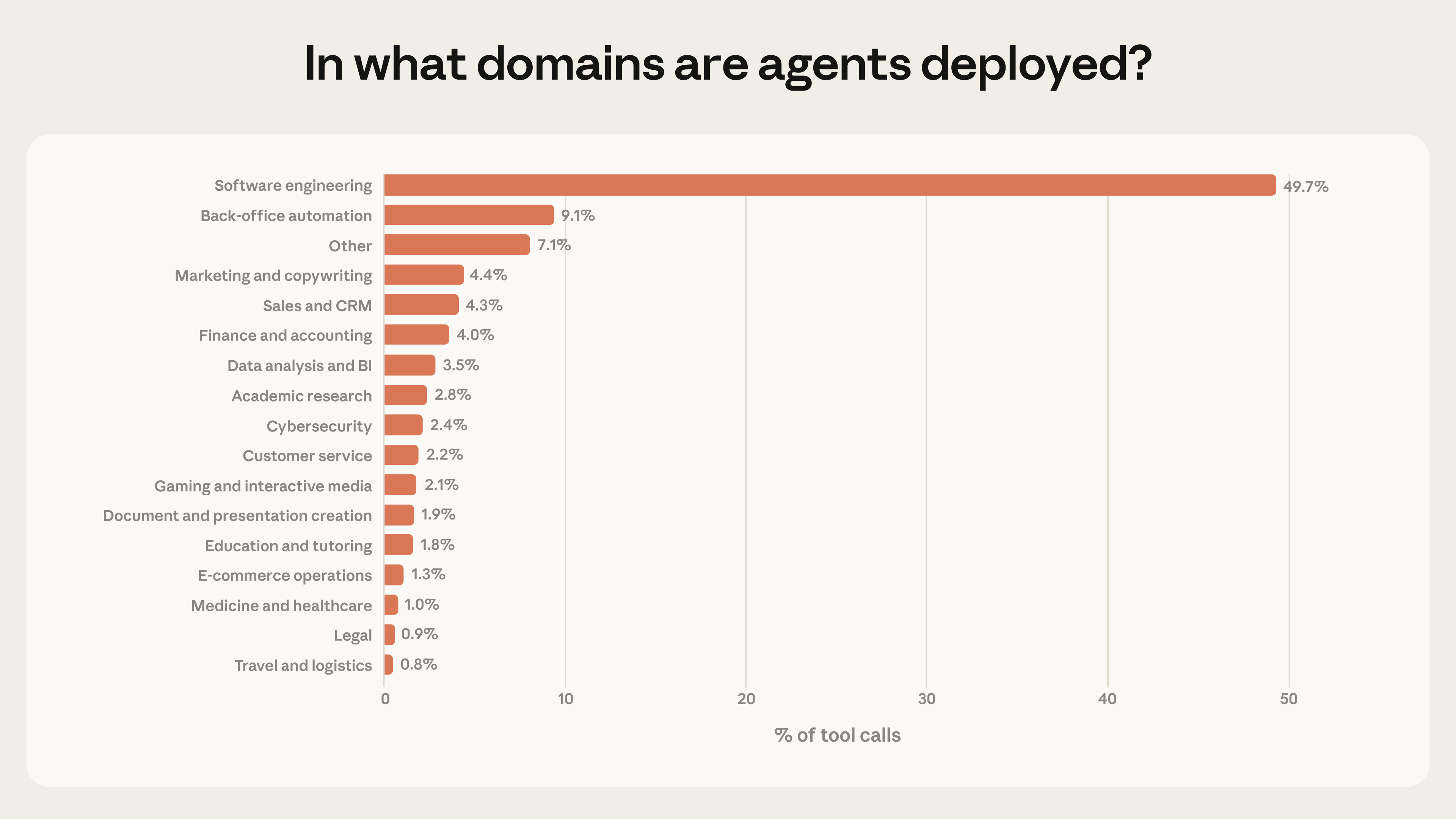
Source: Anthropic, Measuring AI Agent Autonomy in Practice [1]
But there’s a more interesting reading of that data. What if the reason coding agents dominate isn’t because they’re only good at coding — but because coding agents are the first general-purpose agents that actually work? The terminal, the filesystem, the ability to execute commands and write scripts — these aren’t just developer tools. They’re the universal interface for getting things done on a computer.
Cobus Greyling articulated this in his analysis of Anthropic’s vision [2]: the idea that a single powerful model capable of writing and executing code becomes a general-purpose operator for any computable task. Instead of building specialized agents for research, finance, or marketing — each with dedicated tools and integrations — you give one agent the ability to write scripts, call APIs, manipulate files, and generate outputs on the fly.
The specialized agent becomes a temporary script. The integration becomes a one-off API call. The workflow becomes a conversation.
The Evidence Is Piling Up
I’m not the only one who stumbled into this pattern. A growing community of practitioners is documenting how they use coding agents for everything except coding.
Will Schenk at Focus.AI wrote what might be the definitive piece on this: “Claude Code, not Code” [3]. His documented use cases include hiring pipelines (from job description to candidate evaluation to personalized follow-up emails), grocery shopping via browser automation, health tracking with API integrations, and newsletter publishing — all orchestrated through Claude Code. His key insight: “Don’t just ask Claude to do things. Ask it to teach itself how to do them again.”
Tyler Folkman described the mindset shift [4]: “Stop thinking of it as AI that helps you code. Start thinking of it as a brilliant assistant who can read and analyze any file on your computer, execute any command, and write directly to your filesystem.” He organized 12,000 photos, resurrected 73 abandoned side projects, and went from zero to weekly newsletter publishing — all through a terminal.
Jared Lander at Lander Analytics uses Claude Code as an “agentic workflow library” [5] — rapidly prototyping workflows that have nothing to do with software development. Nate’s Newsletter published a 64-page guide to using Claude Code for legal workflows, research systems, and document automation [6].
The pattern is consistent: people discover that a coding agent with filesystem access, command execution, and tool integrations is the most versatile productivity tool they’ve ever used. Not because it codes — but because it can do anything a computer can do, guided by natural language.
What a Non-Coding Day Actually Looks Like
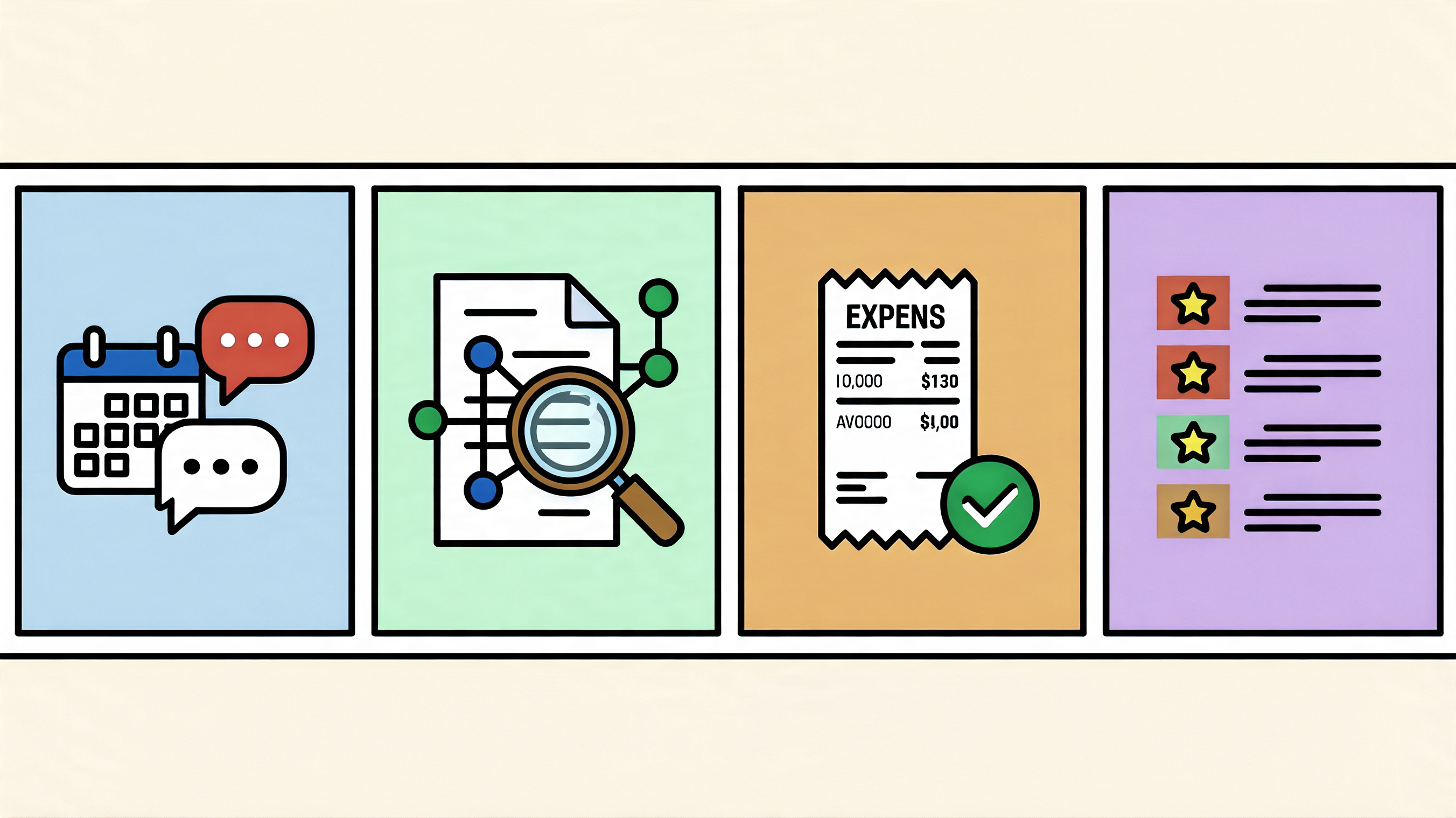
Let me make this concrete. Here’s what my Friday looked like — the one I mentioned at the start — broken down by what the agent actually did:
Meeting Prep I said “prepare my meeting with Bob” — let’s call him that. The agent checked my calendar, found the upcoming 1:1, looked up Bob in our internal directory, read our previous meeting notes from the vault, pulled recent Slack messages from our DM and team channel, and created a meeting notes file in Obsidian with a briefing card — attendees, talking points, recent signals. Six minutes, zero context-switching between apps.
Technical Research A colleague shared a Medium article on geometric memory architectures. I said “new article to research” and pasted the URL. The agent fetched the article, found the referenced academic paper on arXiv, searched my vault for related content, and produced a structured research note with a comparison table, open questions, and connections to our team’s agentic AI initiative. Saved to the vault, cross-linked, ready for the next session.
Travel Expenses “Can you help me with travel expenses?” The agent scanned my calendar for the week, identified a business trip (train bookings with arrows in the subject, hotel calendar entries, a customer event). It searched my email for train booking confirmations, hotel invoices, corporate travel itineraries, and Uber receipts — including one I’d forwarded from my personal inbox just minutes earlier. It downloaded five PDFs to a receipts folder, created a vault note with a copy-paste-ready expense report table, departure/arrival timestamps, and meal allowance calculations based on whether the hotel included breakfast and whether the calendar showed lunch/dinner events.
Reading List Curation “Scan my inbox for things I sent myself.” The agent found five self-sent emails with article links, filtered out the Uber receipt (already processed), fetched content from Medium and LinkedIn, wrote summaries, found vault connections, suggested blog ideas for items with strong potential, and appended everything to my existing reading list with a priority order.
None of this required me to write code. But all of it was powered by a coding agent — one that happens to have access to my calendar, email, Slack, CRM, filesystem, and a knowledge base in Obsidian.
The Architecture That Makes It Work
What separates a one-off “ask Claude to organize my files” experiment from a sustainable professional workflow? Structure.
The system — a set of skills and configuration files on top of Kiro CLI that effectively turns it into my personal work assistant — runs with a layer of skills, steering files, and a persistent knowledge base. Here’s how the pieces fit together:
Skills are workflow definitions. Each skill describes when it should activate (trigger phrases), what tools it needs (MCP servers for calendar, email, Slack, Salesforce), and a step-by-step workflow with constraints. “Sync meetings” is a skill. “Research question” is a skill. “Travel expenses” — which I built during that Friday session — is now a skill too. There are over 30 of them, covering everything from meeting prep to reporting to LinkedIn post drafting.
Steering files are behavioral configuration. They define my identity (name, role, home city), my vault structure (where meetings go, where research goes, where contacts live), and rules the agent should follow (verify AWS claims against official docs, never guess usernames, use specific date formats for expense reports). They’re the equivalent of a team’s coding standards — but for agent behavior.
The vault is long-term memory. An Obsidian vault with structured folders for meetings, customers, initiatives, research, and contacts. Every session reads from and writes to this vault. Meeting notes from January inform meeting prep in March. Research from last week connects to articles found today. The agent doesn’t start from zero — it starts from everything I’ve accumulated.
MCP servers are the tool integrations. Calendar, email, Slack, CRM, AWS documentation, Playwright for browser automation — each exposed as a set of tools the agent can call. The agent doesn’t need pre-built integrations for every possible task. It composes existing tools in novel ways, guided by the skill workflow.
This is the “universal coding agent” thesis made concrete — not as a theoretical argument, but as a daily driver for professional work.
The Comparison That Matters
How does this compare to the other documented non-coding use cases?
| Dimension | Typical non-coding use | Professional workflow (Kiro CLI + skills) |
|---|---|---|
| Scope | Personal productivity, ad-hoc tasks | Full professional role — meetings, research, CRM, expenses, content |
| Persistence | Session notes, CLAUDE.md | Structured vault with templates, wikilinks, frontmatter |
| Skills | Simple tool wrappers | 30+ SOP-format workflows with constraints and references |
| Memory | Session context, project files | Vault as long-term memory across sessions |
| Integration depth | 1-2 APIs per workflow | Calendar, email, Slack, CRM, docs, browser, git — in one session |
| Reusability | Copy-paste prompts | Skills that load automatically based on trigger phrases |
| Evolution | Manual iteration | Skills improve through retrospectives; new skills emerge from real work |
The pattern is the same — coding agent as universal workflow orchestrator. The difference is depth. When you invest in structure — skills, steering, persistent memory — the agent stops being a clever assistant and starts being a reliable colleague.
The Flywheel: Using the System Builds the System
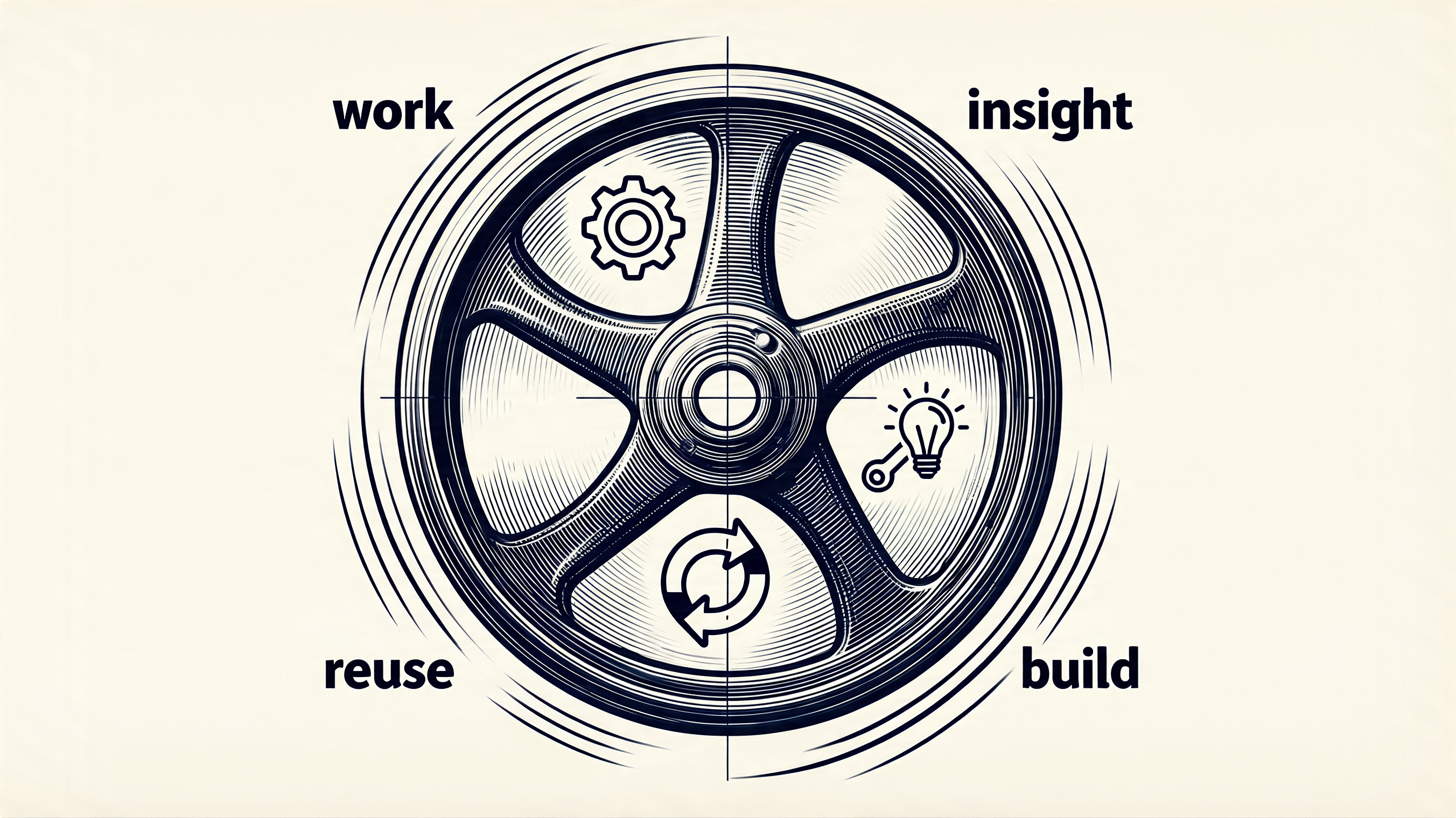
Here’s the part that surprised me most. The system doesn’t just help me work — working with it makes it better.
That Friday, I needed to file travel expenses. There was no skill for that. So the agent and I figured it out together: scan the calendar for trips, search email for receipts, download PDFs, calculate meal allowances, create a structured note. By the end, I said “let’s create a skill out of this.” Ten minutes later, the workflow was encoded as a reusable skill — complete with constraints, templates, and configuration. Next business trip, I just say “travel expenses” and it runs.
This is the flywheel. Every interaction is both productive work and system improvement. Meeting prep reveals a missing contact template — so we add one. Research uncovers a pattern for connecting vault notes — so we encode it. A new expense format emerges — so the skill evolves.
The skills don’t come from a product roadmap or a backlog. They emerge from real work, in real time, while doing the actual job. The system is its own development environment. The user is the developer. And the coding agent — the one that doesn’t code for customers — writes the code that makes itself more capable.
Over 30 skills exist now, and the number grows every week. Not because someone planned them, but because the work demanded them. That’s the compound effect that separates a tool from a system [8].
The Enterprise Gap

Here’s where I need to be honest about the limitations. Everything I’ve described works because it’s personal and sandboxed. I’m the only user. The data is my data. The mistakes affect only me.
Anthropic’s own data shows the “deployment overhang” — models can handle more autonomy than users actually give them. Even experienced users don’t intervene in more than 90% of work steps. But that remaining 10% matters enormously when the stakes are higher than one person’s expense report.
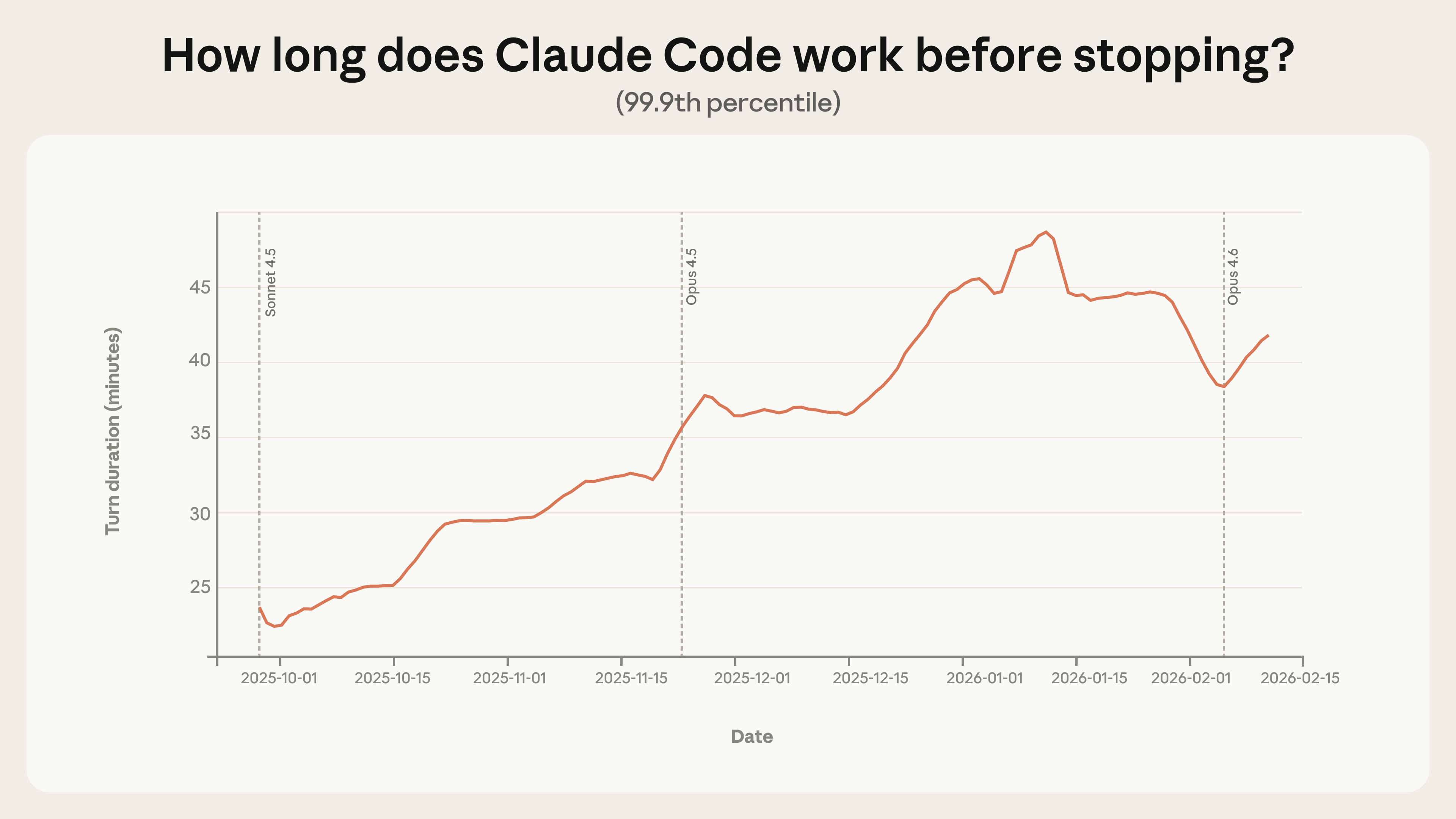
Source: Anthropic, Measuring AI Agent Autonomy in Practice [1]
Greyling identifies the core tension [2]: commercial AI is hugely successful, while enterprise AI is lagging. The popular use cases — code completion, documentation, deep research, internal audits — are all tasks that are not latency-sensitive and don’t face customers directly. The universal coding agent works in the sandbox. It hasn’t proven itself in the arena.
For enterprises, the answer isn’t “give everyone a coding agent and let them figure it out.” It’s structured agent platforms with governance, identity, observability, and cost controls — exactly what services like Amazon Bedrock AgentCore provide [7]. The coding agent handles the creative, ad-hoc, personal work. The governed platform handles the customer-facing, regulated, team-scale work.
Both will coexist. The question is where the boundary sits — and it’s moving.
What This Means for You
If you’re a knowledge worker — not just a developer — and you haven’t tried using a coding agent for your actual work, you’re leaving the biggest productivity gain on the table.
Start small. Pick one recurring task that involves multiple tools — meeting prep, expense reports, research synthesis, content curation. Give the agent access to the relevant data sources. See what happens.
Then do what Will Schenk suggests: ask it to document how it did the task, so it can do it again. That’s the moment it stops being a demo and starts being a workflow.
The coding agent that doesn’t code might be the most important tool you’re not using yet.
Sources
- [1] Anthropic, “Measuring AI Agent Autonomy in Practice” (2026) — https://www.anthropic.com/research/measuring-agent-autonomy
- [2] Greyling, C. “Anthropic Says Coding Agents Are Becoming the Universal Everything Agent” — https://cobusgreyling.substack.com/p/anthropic-says-coding-agents-are
- [3] Schenk, W. “Claude Code, not Code” — Focus.AI (Jan 2026) — https://thefocus.ai/posts/claude-code-non-coding
- [4] Folkman, T. & Sundaresan, S. “Claude Code Is Not a Coding Tool—It’s a Personal Assistant That Changes Everything” — Gradient Ascent (Sep 2025) — https://newsletter.artofsaience.com/p/claude-code-is-not-a-coding-toolits
- [5] Lander, J. “Claude Code as an Agentic Workflow Library” — Lander Analytics (Feb 2026) — https://www.landeranalytics.com/post/claude-code-as-an-agentic-workflow-library
- [6] Nate’s Newsletter, “Claude Code Without the Code: The Complete Guide to Building AI Agents for Everything Else” — https://natesnewsletter.substack.com/p/claude-code-without-the-code-the
- [7] Amazon Bedrock AgentCore — https://aws.amazon.com/bedrock/agentcore/
- [8] Christoph, S. “From Chaos to Control: Building Predictable AI Agents That Get Smarter Over Time” — https://schristoph.online/blog/from-chaos-to-control-building-predictable-ai-agents-that-ge/
Related writing:
- Technology Evolution Doesn’t Move in a Straight Line—It Spirals — the “Beyond Code” section foreshadowed this article
- From Chaos to Control: Building Predictable AI Agents — tools as reusable components for agent predictability
- How do we pick the RIGHT AI agent use case? — the 4-quadrant evaluation for choosing where agents add value
- Balancing AI Agents Agency with Control — Anthropic’s autonomy study and the agency vs control tension
- MCP Tool Chaos — got lost in authentication and governance?! — the governance angle for enterprise adoption
- Kiro Subagents: Scaling Development with Specialized AI Agents — the skill/subagent architecture that powers the setup
- On the Loop, Not In It — But Code Quality Still Matters — the human-agent interaction model
Cross-posted to LinkedIn